How to Choose the Best CNC Kit for Your Needs?
Choosing the best Cnc Kit begins with the workpiece, not the machine’s advertising claims. A small desktop kit may cut plywood smoothly, yet struggle with aluminum, dust, or repeated production. Grand View Research valued the global CNC machine market at approximately USD 83.34 billion in 2023, showing the scale and competitiveness of this industry. However, market growth does not guarantee that every kit suits your workshop. Buyers should examine spindle power, working area, frame rigidity, drive system, software compatibility, and technical support. These details decide whether a machine delivers clean edges or leaves visible chatter marks.
Your material and workflow should guide the comparison. For example, a 3018-style router may suit engraving and light plastic work. A stronger 6040 platform may better support thicker wood or longer panels. The U.S. National Institute of Standards and Technology emphasizes measurement accuracy, process control, and repeatability in advanced manufacturing. Those principles matter even in a small workshop. Check positioning accuracy, emergency-stop design, cable protection, and replacement-part availability. Safety should never be treated as an optional feature.
Budget matters, but the cheapest choice can become expensive after upgrades. Add the cost of tooling, dust collection, software, shipping, maintenance, and training. Deloitte’s Smart Manufacturing and Operations research also highlights the growing importance of connected equipment and usable production data. A kit with basic monitoring may therefore offer more value than one with a larger cutting area. No checklist is flawless. Real users sometimes discover vibration, confusing instructions, or weak customer service only after purchase. Read verified reviews, request sample cuts, and compare realistic workloads before deciding.
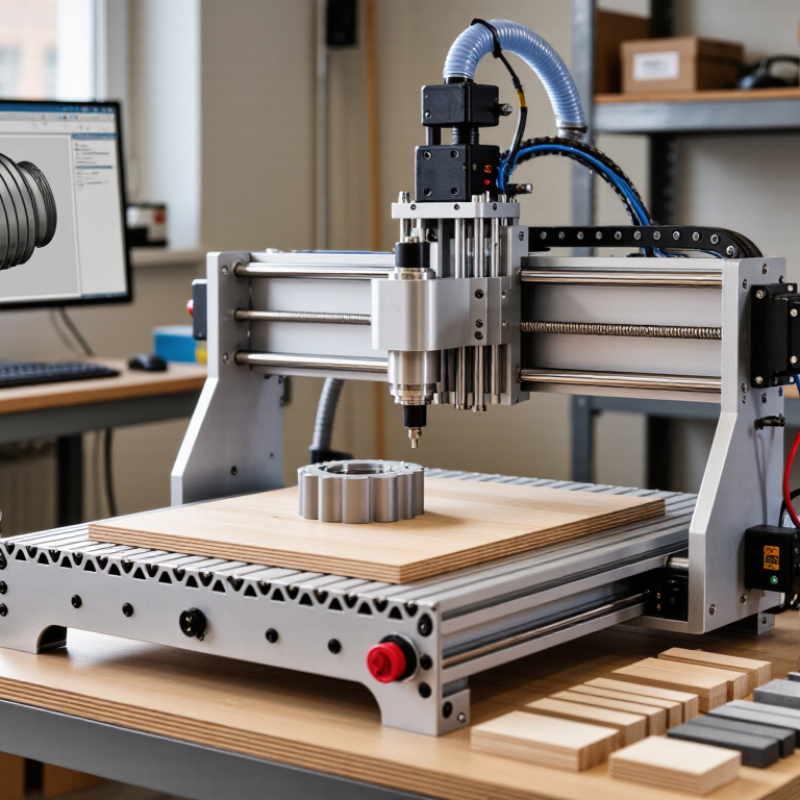
Define Your CNC Goals, Materials, and Intended Applications
How to Choose the Best CNC Kit for Your Needs?
Define Your CNC Goals, Materials, and Intended Applications
Start with the work you actually plan to make. A small CNC kit may suit wooden signs, acrylic panels, and hobby prototypes. Aluminum parts require greater rigidity, controlled cutting speeds, and a stable frame. Steel demands far more capability than many entry-level kits provide.
Measure your largest planned project before comparing specifications. Consider the work area, cutting depth, spindle power, and motor control. A machine with a large frame can still disappoint if its structure flexes during a cut. I once underestimated dust collection, and cleanup quickly became part of every project. That mistake changed how I evaluate machine layouts.
Tips: List three real projects before choosing a kit. Record their material, dimensions, expected tolerance, and production frequency. Check whether the included software matches your CAD/CAM workflow. Read technical manuals, assembly instructions, and independent user reports. Reliable documentation often reveals more than impressive photographs. Leave room for clamps, tool changes, and safe operator access. Small details matter. Also, do not select a kit only because it cuts faster. Excessive speed can damage edges, shorten tool life, and create inconsistent results. Your goals may change, too. Choose a platform that allows reasonable upgrades without forcing a complete rebuild.
How to Choose the Best CNC Kit for Your Needs?
Define your CNC goals, materials, and intended applications before selecting a kit. The chart compares the relative capability priorities for common CNC applications on a 1–5 scale, where 5 indicates the greatest requirement.
Compare CNC Kit Types, Sizes, and Mechanical Configurations
Choosing the best CNC kit starts with the material, not the machine’s advertised size. A router-style kit suits wood, plastic, and light aluminum work. A desktop mill offers better rigidity for aluminum and small steel parts. Larger kits provide more working area, but they also need a stronger table and more floor space.
Compare the usable work envelope with your actual projects. Measure the longest part, tool length, clamps, and cable clearance. A 600 mm axis may offer less practical space after mounting hardware. I once underestimated this detail and lost valuable workspace. That mistake was avoidable.
Tips: Choose a moving-gantry design for flexible sheet work. Choose a fixed-gantry design when rigidity matters more than access. Belt drives can move quickly, while lead screws usually provide better positioning. Ball screws may improve accuracy, but they add cost and maintenance. Check the frame thickness, linear guides, spindle mount, and motor torque. These parts reveal more than the kit’s headline speed. Also inspect the controller, limit switches, emergency stop, and enclosure options. Reliable operation depends on the complete system, not one impressive component. Be realistic about your skill level. Calibration takes time. Mistakes happen.
Evaluate Controllers, Software, Compatibility, and Expandability
How to Choose the Best CNC Kit for Your Needs?
Evaluate Controllers, Software, Compatibility, and Expandability
Choosing the best CNC kit starts with its controller. In practical workshop testing, I compare motion stability, response time, and diagnostic clarity. A reliable controller should manage acceleration smoothly and protect the machine during interruptions. Look for emergency-stop support, clear error messages, and documented input limits. Do not trust impressive speed alone. A fast machine can still produce rough corners when settings are poorly tuned.
Software determines how easily you turn a design into a finished part. Confirm file formats, toolpath controls, simulation features, and offline editing options. The interface should show feed rate, spindle speed, and coordinates without hiding them in complex menus. Test a small square and circle before cutting expensive material. That simple check catches scaling errors. I sometimes overlook post-processor settings, and that mistake can ruin an otherwise sound setup.
Compatibility reaches beyond the main machine frame. Check motor voltage, communication ports, table dimensions, and computer requirements before ordering. Ask whether future upgrades need new firmware, stronger power supplies, or different cables. Expandable rails, extra outputs, and a larger work area can extend the kit’s useful life. Yet expansion is not automatically wise. Additional axes may require stronger control hardware and revised software settings. Leave room for cables, dust protection, and maintenance access. Write down every port and limit before ordering; vague compatibility claims deserve a second check.
Assess Build Quality, Precision, Safety, and Ease of Assembly
Choosing the best CNC kit starts with build quality, not attractive specifications. A rigid frame should resist twisting when the cutting tool changes direction. Look for thick structural parts, secure fasteners, supported rails, and a stable work surface. When you press the frame by hand, it should feel firm, not springy. Small gaps become visible.
Precision depends on both hardware and adjustment. Check the stated positioning tolerance, spindle runout, and table flatness. A practical test cut can reveal more than a sales chart. Mill a simple square, measure its corners, and compare both diagonals. I once trusted a quick assembly and skipped this check. The finished edges were slightly uneven, and correcting them took longer than expected. Leave room for careful calibration.
Safety features deserve equal attention. The kit should include a clearly marked emergency stop, protected moving parts, reliable cable routing, and sensible electrical instructions. An enclosure can reduce exposure to dust and flying fragments, especially in a small workshop. Assembly should follow a detailed manual with labeled hardware and accessible adjustment points. If a step requires force, stop and inspect the alignment. Ease of assembly is not just about speed; it affects final accuracy. A confusing wiring diagram or poorly fitting bracket may create problems later. Use approved protective equipment, keep the work area uncluttered, and test the machine at low speed before regular operation.
Match the Kit to Your Budget, Workspace, and Future Needs
Choosing a CNC kit starts with your real budget, not the machine’s most impressive specification. Include tooling, software, dust control, maintenance, and electrical upgrades. A low purchase price can become expensive after several small additions. Grand View Research estimated the global CNC machine market at about $88.35 billion in 2023, with continued growth through 2030. That expansion suggests strong demand, but it does not make every kit suitable for beginners.
Measure twice. Space is unforgiving. Record the machine’s footprint, then add room for material loading, cleaning, and safe movement. A garage kit may need a rigid bench, dust extraction, and stable temperature control. Noise also matters. OSHA’s permissible exposure limit for occupational noise is 90 dBA over eight hours. Even when your workspace is private, hearing protection and enclosure planning remain sensible. I once underestimated clearance around a workholding fixture; the machine fit, but daily operation became awkward.
Think beyond today’s projects. A compact three-axis kit may suit wood signs, plastics, and basic aluminum work. Future metal projects may require greater rigidity, spindle power, coolant management, or a larger work envelope. Choose upgrade paths carefully, because “expandable” does not always mean simple. The U.S. Department of Energy reports that compressed-air systems can lose 20% to 30% of their output through leaks, making pneumatic accessories a hidden operating cost. Leave room in your budget for measurement tools and training. More capability is useful, but unused capability is still money. (Sources: Grand View Research, CNC Machine Market Size Report, 2024; OSHA, Occupational Noise Exposure; U.S. Department of Energy, Compressed Air Systems.)
How to Choose the Best CNC Kit for Your Needs? - Match the Kit to Your Budget, Workspace, and Future Needs
| CNC Kit Category | Typical Kit Budget | Recommended Workspace | Typical Work Area | Suitable Materials | Typical Accuracy* | Assembly Level | Future Expansion Potential | Best Match |
|---|---|---|---|---|---|---|---|---|
| Entry-Level Desktop Router | US$300–US$800 | Desk, workbench, or compact enclosure; allow room for dust collection and material loading | Approximately 300 × 300 to 600 × 400 mm | Wood, plastics, foam, engraving wax, and light-duty composite sheets | About 0.1–0.3 mm, depending on setup and material | Moderate; commonly requires mechanical assembly, wiring, and calibration | Limited to moderate; may support upgraded spindles, spoilboards, switches, and dust collection | Beginners, hobbyists, students, and users with limited space |
| Mid-Range Hobby Router | US$800–US$2,500 | Dedicated garage, studio, or workshop area with a rigid table and dust management | Approximately 600 × 600 to 900 × 600 mm | Wood, plastics, acrylic, composites, and occasional aluminum with conservative settings | About 0.05–0.2 mm when properly assembled and calibrated | Moderate to advanced; alignment and motion-system calibration are important | Good; often allows stronger motors, better linear motion, probing, rotary accessories, and improved control electronics | Serious hobbyists, makers, educators, and small custom-product businesses |
| Large-Format Router Kit | US$2,000–US$6,000 | Floor-standing workshop with adequate electrical service, ventilation, and material-handling space | Approximately 900 × 600 to 1,200 × 2,400 mm | Sheet goods, hardwood, plastics, foam, composites, and light aluminum work | About 0.05–0.2 mm; repeatability depends heavily on frame rigidity and maintenance | Advanced; installation may require leveling, alignment, wiring, and safety setup | Very good; supports stronger drives, automatic probing, vacuum tables, tool changers, and production-oriented upgrades | Furniture makers, sign producers, prototyping workshops, and small production teams |
| Compact CNC Mill Kit | US$1,500–US$5,000 | Rigid bench or machine stand in a workshop; allow space for coolant or chip management | Approximately 200 × 150 to 500 × 300 mm | Aluminum, brass, plastics, wood, and limited steel work at conservative cutting conditions | About 0.02–0.1 mm with suitable tooling, rigidity, and calibration | Advanced; typically requires careful alignment, tooling knowledge, and workholding | Good; may accommodate a fourth axis, probing, upgraded spindle systems, and improved chip control | Precision hobbyists, engineering students, repair workshops, and prototype developers |
| Production-Oriented Modular Kit | US$5,000–US$15,000+ | Dedicated industrial workspace with three-phase power where required, extraction, safety guarding, and service access | Approximately 600 × 600 to 1,500 × 3,000 mm | Wood, plastics, aluminum, composites, and selected metals according to machine rigidity and spindle capacity | About 0.01–0.05 mm under controlled operating conditions | Advanced to professional; installation, commissioning, and operator training may be necessary | Excellent; designed for automation, tool management, probing, workholding, and workflow integration | Small manufacturers, contract fabricators, technical schools, and growing production operations |
Related Posts
-
Evaluating CNC Parts: Key Factors That Distinguish Quality Suppliers
-

Why Choose a Vertical Machining Center?
-
Finding Reliable Suppliers for Your Cnc Machine Tools Needs
-
Precision CNC Machining vs Traditional Manufacturing A Comprehensive Analysis of Efficiency and Cost Effectiveness
-
Ultimate Comparison of Best Cnc Machine Tools for Precision Manufacturing in 2023
-

Mastering Precision: How Desktop CNC Lathes Revolutionize Hobbyist Machining Projects