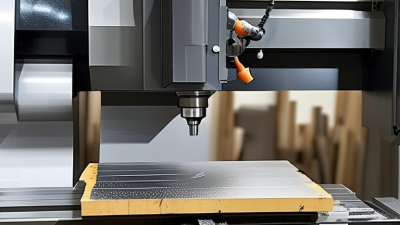
Why Choose a Desktop CNC Milling Machine?
Why Choose a Desktop Cnc Milling Machine?
A Desktop Cnc Milling Machine brings practical subtractive manufacturing into a compact workspace. It can cut aluminum, acrylic, hardwood, plastics, and other suitable materials with controlled tool movement. For engineers, educators, makers, and small businesses, this access can reduce dependence on large workshops. A benchtop machine may fit beside a computer, yet it still demands careful planning. Measure twice.
In daily use, the benefits become visible through small details. A rigid frame can reduce vibration during shallow aluminum passes. A clear enclosure can contain chips and improve operator awareness. Digital design files also support repeatable production, from sensor brackets to custom panels. Experienced users understand that accuracy depends on more than advertised resolution. Tool sharpness, workholding, spindle speed, feed rate, and material behavior all matter. This is where practical knowledge becomes valuable.
However, desktop milling is not effortless. Noise, dust, tool breakage, and limited travel can affect the workflow. Some machines struggle with thick metal or demanding production schedules. I have found that beginners often focus on maximum speed, while stable cutting usually matters more. Results can vary, even with identical settings. That limitation deserves honest attention. Before choosing a model, compare its rigidity, working area, software compatibility, safety features, maintenance requirements, and manufacturer support. Reliable documentation and replacement parts can matter more than a low purchase price. Used responsibly, a desktop mill offers a measured path from digital concepts to physical components, while encouraging users to test, adjust, and improve their methods.
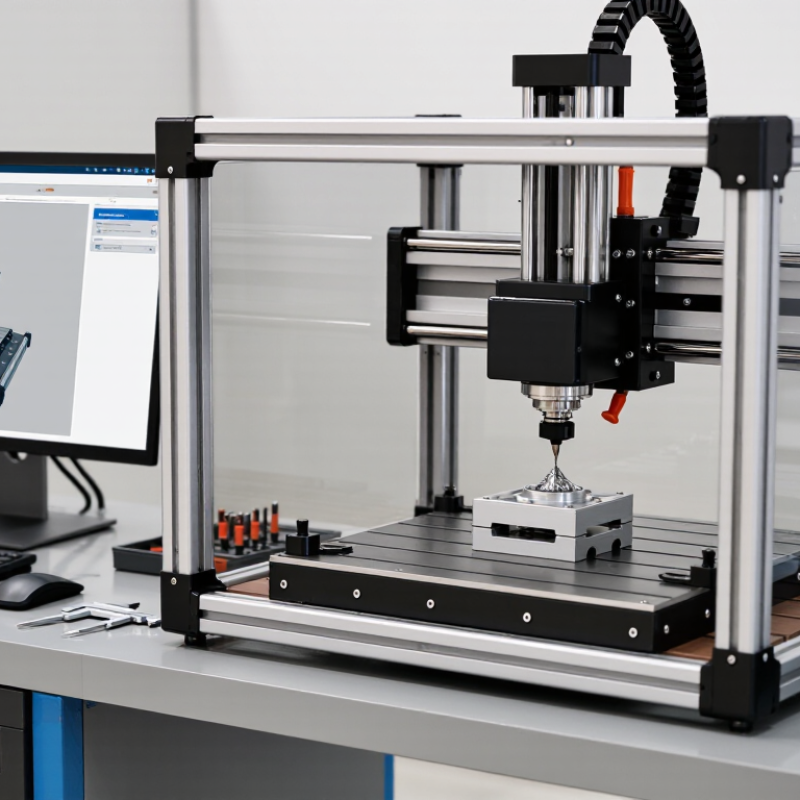
What Is a Desktop CNC Milling Machine?
A desktop CNC milling machine is a compact, computer-controlled tool for cutting solid materials. CNC means computer numerical control. The machine follows programmed movements along several axes. A rotating cutter removes material from wood, plastic, wax, or suitable metals. The workpiece stays secured on a small table while the spindle travels above it.
Unlike a 3D printer, it subtracts material instead of building layers. A typical setup includes a frame, spindle, cutting tools, motors, control software, and clamps. The software converts a digital design into toolpaths. Those paths control speed, depth, direction, and cutting order. Small size matters. It fits on a workbench and suits schools, studios, laboratories, and compact workshops.
In practical workshop use, I have found that setup quality affects results more than expected. A loose clamp can ruin a precise part within minutes. Dust collection also deserves attention. Metal chips require different handling from plastic shavings. Desktop machines help users test housings, brackets, molds, and decorative parts without renting industrial equipment. They also encourage faster design changes. Still, the cutting area is limited, and smaller motors may struggle with hard materials. I once trusted a perfect simulation too much; the real cutter exposed vibration that the screen could not show. Careful tool selection, measured feeds, and regular calibration remain essential.
How Desktop CNC Milling Machines Work
A desktop CNC milling machine turns digital instructions into controlled cutting motion. The process begins with CAD geometry and CAM toolpaths. CAM converts those paths into G-code, defining coordinates, feed rate, spindle speed, and tool changes. The controller reads each command and drives motors along the X, Y, and Z axes. A rotating end mill removes material layer by layer. Small, precise movements. This is the core mechanism.
The workpiece must be clamped firmly. It usually rests on a spoilboard or vise, while clamps resist cutting forces. The spindle controls tool speed, while feed rate controls cutting progress. If either value is wrong, aluminum may chatter, wood may burn, and edges may tear. Tool diameter, flute count, material hardness, and chip evacuation also change the result. There is no magic setting.
Backlash and frame flex remain common desktop limitations. A dial indicator can reveal alignment errors before they ruin a part. The 2024 International Federation of Robotics report recorded 541,302 industrial robot installations worldwide in 2023, highlighting the value of repeatable motion. Desktop milling applies that principle on a smaller scale. Grand View Research forecasts roughly 8% annual growth for the CNC machine market through 2030. That growth reflects wider digital manufacturing adoption, not guaranteed desktop accuracy. My own setup is never perfectly quiet. Operators still need to inspect tool wear, tighten fasteners, and question suspicious results.
Key Advantages for Small-Scale Manufacturing
For small-scale manufacturing, a desktop CNC milling machine turns digital designs into physical parts with controlled, repeatable movements. OECD’s SME and Entrepreneurship Outlook 2023 notes that small and medium-sized enterprises represent nearly all firms in OECD economies. Their needs are practical: limited floor space, short production runs, and careful spending. A desktop mill can reduce setup distance, simplify prototype changes, and support in-house production. An operator can adjust a toolpath at a workstation, inspect the cut, and make another part the same afternoon. That speed matters when customers request small design changes.
The financial case needs caution. Deloitte’s 2024 Smart Manufacturing Survey found that 86% of manufacturing leaders expect smart manufacturing to remain a major competitiveness factor within five years. A desktop CNC system offers an accessible entry point, especially for training, fixtures, replacement components, and custom batches. It also creates useful production records through digital files and measured tolerances. Small footprint. Lower logistical friction. However, it is not automatically cheaper. Cutting hard metals may require slower feeds, stronger tooling, and more operator attention. Dust control and workholding still matter. My practical experience suggests that poorly planned setups erase much of the machine’s advantage. NIST manufacturing guidance also emphasizes process control and measurement, not equipment alone. The best results come from pairing modest hardware with calibrated tools, documented procedures, and honest checks of cycle time.
Why Choose a Desktop CNC Milling Machine?
Typical small-batch benchmark showing how CNC automation can reduce repeat-part machining time compared with manual milling.
Values represent common planning estimates for producing a 20-piece batch of simple aluminum components, including setup and machining time. Actual results vary with part geometry, tooling, material, and operator experience.
Materials and Projects Suitable for Desktop Milling
Why Choose a Desktop CNC Milling Machine?
Materials and Projects Suitable for Desktop Milling
A desktop CNC milling machine suits small, controlled projects with clear measurements. I have used one for acrylic panels, hardwood fixtures, aluminum brackets, and wax prototypes. These materials cut differently. Hardwood may splinter, while aluminum can grab an unsuitable tool. Plastic often melts when feed rates are too slow. Start with flat stock and shallow passes. Small machines are less forgiving than industrial equipment.
The U.S. Bureau of Labor Statistics reported a median annual machinist wage of $49,140 in May 2023. That figure reflects the value of practical machining skills, not machine size. Desktop milling helps users practice tool selection, workholding, feeds, speeds, and inspection. Suitable projects include enclosure plates, camera mounts, engraved signs, replacement knobs, and simple mechanical parts. Avoid large steel components or deep pockets. Rigidity becomes a serious limitation. My early aluminum cuts looked acceptable, but the edges were rough. I had ignored chip evacuation.
Tips: Use a sharp two-flute cutter for many plastics and aluminum jobs. Secure the material firmly. Measure the stock before cutting. Keep a written record of spindle speed, feed rate, depth, and results. ASTM machining guidance emphasizes repeatable measurement and documented conditions. That habit improves reliability, although it does not eliminate mistakes. A digital caliper, dust extraction, eye protection, and careful setup matter as much as software.
| Material | Desktop Milling Suitability | Typical Stock or Working Thickness | Recommended Cutting Tools | Expected Surface Finish | Suitable Projects | Important Considerations |
|---|---|---|---|---|---|---|
| Hardwood | Excellent | 3–25 mm sheets or small solid blocks | 1-flute or 2-flute carbide end mills; upcut or downcut bits | Good to very good with a finishing pass | Signs, decorative panels, small furniture parts, boxes, templates, and instrument components | Secure the workpiece firmly and use dust extraction. Grain direction can affect edge quality and tool load. |
| Plywood and MDF | Excellent | 3–18 mm sheets | Carbide compression, downcut, or upcut bits | Clean on the top surface; MDF edges may need sealing or sanding | Enclosures, organizers, prototypes, jigs, model parts, and flat-pack assemblies | Plywood veneers can splinter. MDF produces fine dust, so ventilation and extraction are recommended. |
| Acrylic and PMMA | Excellent | 2–12 mm sheets | Single-flute O-flute carbide end mills | Clear edges are possible with suitable speeds, chip removal, and polishing | Control panels, signage, light guides, display parts, covers, and prototypes | Keep chips moving away from the cut to reduce melting. Avoid excessive heat and use protective film where appropriate. |
| HDPE and Acetal (POM) | Excellent | 3–20 mm sheets or small blocks | Sharp single-flute or two-flute carbide end mills | Smooth and functional; acetal generally gives cleaner precision surfaces | Bushings, spacers, gears, brackets, sliding components, and mechanical prototypes | Plastic can deform during clamping. Use sharp tools, adequate chip clearance, and light finishing passes. |
| Machinable Wax | Excellent | 10–50 mm blocks | Small carbide ball-nose or flat end mills | Very smooth and highly detailed | Form studies, jewelry patterns, casting masters, molds, and educational demonstrations | Wax is easy to cut and reuse, making it useful for testing toolpaths before machining harder materials. |
| Modeling Foam | Excellent | 10–75 mm blocks | Ball-nose or straight carbide end mills | Good for prototypes; finer tools improve curved surfaces | Scale models, packaging forms, sculptures, terrain models, and aerodynamic mock-ups | Foam cuts quickly but can generate debris. Use a finishing pass for complex three-dimensional surfaces. |
| Aluminum | Good with proper setup | 1–10 mm plate or small billets | Sharp 1-flute or 2-flute carbide aluminum end mills | Good on rigid machines with suitable workholding and chip evacuation | Brackets, front panels, fixtures, heat-sink prototypes, nameplates, and small mechanical parts | Use shallow radial and axial cuts, control heat, and prevent chip recutting. Machine rigidity strongly affects results. |
| Brass | Good with proper setup | 1–8 mm plate or small blocks | Sharp carbide end mills, commonly with two flutes | Good to very good for small detailed parts | Engraved plates, decorative hardware, small fittings, clock components, and prototypes | Brass is generally easier to machine than steel, but secure clamping and conservative cutting parameters remain important. |
| Copper | Limited to suitable machines | Thin sheet or small blocks, typically up to 6 mm | Very sharp carbide tools with strong chip evacuation | Acceptable for simple profiles; burrs and built-up edge may occur | Electrical prototypes, busbar samples, engraved parts, and small conductive fixtures | Copper is soft and ductile, so it can smear or form burrs. Use sharp tools and avoid excessive rubbing. |
| PCB and FR-4 | Good for light-duty work | Approximately 0.8–3.2 mm circuit boards | Carbide engraving cutters, PCB drills, and small end mills | Suitable for isolation routing and drilling; not equivalent to plated industrial fabrication | Prototype circuit boards, isolation routing, drilling, and small electronic fixtures | FR-4 glass fibers are abrasive. Use dust extraction, eye protection, and dedicated tools where possible. |
| Carbon Fiber Sheet | Limited | 1–5 mm sheets | Diamond-coated or carbide tools designed for abrasive composites | Clean results are possible, but edge fraying may require finishing | Lightweight brackets, drone components, panels, and experimental fixtures | Dust can be hazardous and electrically conductive. Use effective extraction, respiratory protection, and careful workholding. |
| Mild Steel | Generally unsuitable | Only thin material on exceptionally rigid desktop equipment | Short carbide tools with conservative cutting conditions | Variable; dimensional accuracy and tool life can be difficult to maintain | Small demonstration cuts or engraving rather than production components | Desktop machines often lack the rigidity, spindle power, cooling, and workholding needed for reliable steel milling. |
Actual results depend on machine rigidity, spindle power, cutter geometry, workholding, material condition, toolpath strategy, and cutting parameters. Always begin with conservative settings and follow the machine and tooling safety instructions.
Factors to Consider Before Choosing a Desktop CNC Mill
A desktop CNC milling machine can turn a small workbench into a practical prototyping space. Yet size should not decide the purchase alone. Grand View Research estimated the global CNC machine market at about US$88 billion in 2023. That growth reflects demand for automation, repeatability, and shorter development cycles.
Before choosing a desktop CNC mill, measure your real work. Check the X, Y, and Z travel against your largest planned part. Then examine frame rigidity, spindle power, collet size, and supported materials. Aluminum needs more stability than plastic or soft wood. A light frame may produce visible chatter, especially around corners.
Accuracy claims also need context. Ask whether they describe positioning accuracy, repeatability, or results from a complete cutting test. Software compatibility matters too. A capable machine can still frustrate users with weak CAM workflows. I often find that the cheapest calculation is incomplete. Tooling, workholding, dust extraction, maintenance, and training can change the final cost.
Tips: Cut a sample part before committing. Test a pocket, a drilled hole, and a thin wall. Listen for vibration. Check how quickly chips leave the cutting area.
Deloitte’s 2024 Smart Manufacturing and Operations Survey found that 86% of manufacturers consider smart manufacturing important. That supports connected workflows, but desktop users should avoid buying features they cannot operate or maintain.
Leave space around the machine, confirm electrical requirements, and select documented safety controls. A slower, rigid mill may teach better habits than a fast machine with optimistic specifications.
Related Posts
-
What Is the Best China Desktop CNC Milling Machine?
-
What Are the Top Desktop CNC Milling Machine Types in 2026?
-
Exploring Industry Trends: Desktop CNC Milling Machines at the 138th Canton Fair 2025 - A Data-Driven Insight
-
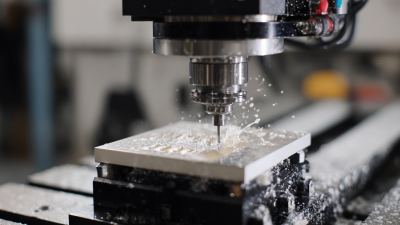
Innovative Approaches to Sourcing the Best Desktop Cnc Milling Machine Worldwide
-
Navigating 2025: The Ultimate Guide to the Best Small CNC Lathe Innovations for Global Buyers
-
7 Tips for Buying a Small Milling Machine?